

 Loading...



































































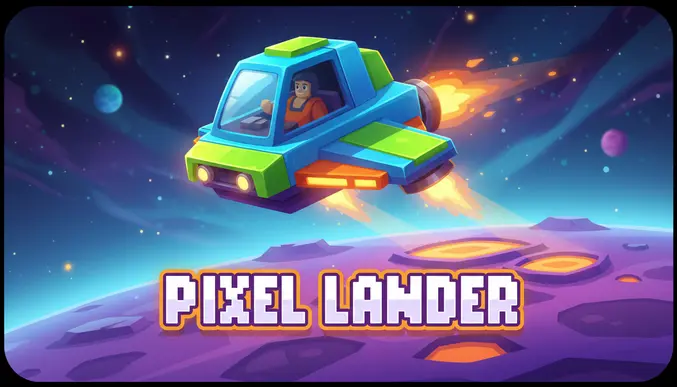
Play Pixel Lander online for free, an exciting space adventure where gravity is your biggest enemy! Have you ever wondered what it takes to be a real astronaut piloting a spaceship? In this game, you get to take control of a retro lunar module and attempt to land safely on the surface of different planets. It is not as easy as it looks—you have to fight against gravity, manage your fuel, and steer carefully to avoid crashing into the rocky terrain.
This game is perfect for players who love a challenge and enjoy testing their skills. Whether you are playing on a phone, tablet, or computer, Pixel Lander is packed with retro pixel art graphics, tricky levels, and physics-based fun that will keep you hooked for hours. You will need steady hands and quick reflexes to succeed!
Do you have the pilot skills to land the ship without exploding?
About Pixel Lander
Pixel Lander is a physics-based arcade game that tests your ability to pilot a spaceship under the influence of gravity. It was first released in 2017 and quickly gained popularity among fans of classic retro games due to its simple yet difficult mechanics.
The game was created by an indie game developer, who wanted to bring the classic "Lunar Lander" style of gameplay to modern web browsers. Whether you are playing on a desktop, tablet, or mobile phone, Pixel Lander is designed to be accessible and responsive, ensuring that your piloting skills are the only thing standing between a safe landing and a crash.
Thanks to its nostalgic 8-bit graphics and addictive gameplay loop, Pixel Lander continues to be a favorite choice for kids and players of all ages who love space exploration and skill-based challenges!
Pixel Lander Gameplay
Pixel Lander is deceptively difficult! You start with a fragile spaceship hovering above a jagged alien landscape. Your main goal is to guide the ship safely onto a flat landing pad. You need precise control over your thrusters to slow down your descent while steering left and right to avoid walls and rocks.
As you beat levels, the game gets harder. The landing spots become smaller, the terrain gets more dangerous, and your fuel supply becomes more limited. Some levels introduce moving obstacles or tighter spaces that require pixel-perfect movement. This unique mix of puzzle-solving and piloting skill makes it stand out from other arcade games.
The gameplay relies heavily on physics. If you come down too fast, you will explode. If you hit the ground at a bad angle, you will crash. You must manage your fuel gauge carefully; if you run out of fuel mid-air, you lose control of the ship and will fall to the ground. Upgrading your skills in timing and resource management is key.
Advanced players will encounter levels with tricky gravity zones and narrow caves. Success depends entirely on your ability to make tiny adjustments with your thrusters. It is a game where patience and steady hands are rewarded with victory.
Platform
You can play this game directly in your web browser, whether you're using a desktop, laptop, tablet, or mobile device.
How to Play Pixel Lander?
In Pixel Lander, your main goal is to land your spacecraft on the designated landing zone without crashing or running out of fuel. You must navigate through narrow passages and avoid hitting the rocky walls. You must feather your thrusters to maintain a safe speed and ensure your landing gear touches the ground gently.
The game features multiple levels that increase in difficulty. In the beginning, you have plenty of space and fuel, but later stages require you to conserve every drop of fuel. If you hit a wall or land too hard, your ship explodes, and you have to restart the level. However, checkpoints in longer levels help you get back into the action quickly.
You are scored based on how much fuel you have left and how softly you land. This motivates you to replay levels to get a perfect score and prove you are the best pilot in the galaxy.
Controls
Pixel Lander uses simple keyboard and touch controls that are easy to learn but hard to master. Here's how you control your spaceship:
- On Computer:
- Up Arrow / W Key: Activate Main Thruster (Fly Up)
- Left Arrow / A Key: Rotate Left
- Right Arrow / D Key: Rotate Right
- On Mobile:
- Tap Screen (Left/Right): Rotate the ship
- Tap Screen (Both sides/Center): Activate Thruster
These controls allow for precise movements, making it easy for anyone to pick up and play instantly.
Tips and Tricks for Pixel Lander
Want to become a master astronaut in Pixel Lander? These simple and helpful tips will improve your piloting skills and help you unlock cool rewards:
- Save Your Fuel: Don't hold the thrust button down constantly; tap it gently to hover.
- Watch Your Speed: If you descend too fast, you will crash even if you hit the landing pad correctly.
- Level Out: Always make sure your ship is flat and horizontal before touching the ground.
- Look Ahead: Plan your route before you start moving to avoid dead ends.
- Use Gravity: Let gravity pull you down naturally to save fuel, only using thrust to slow down at the end.
- Don't Panic: If you start spinning, use short taps to stabilize instead of overcorrecting.
- Practice Hovering: Learn to maintain a steady altitude to navigate through tight caves.
- Ignore Time: There is usually no time limit, so take it slow and be safe.
Follow these tips and you'll be conquering the galaxy in no time!
Features of Pixel Lander
Pixel Lander is a retro-style arcade game designed for players of all ages. Below are the top features that make this game so enjoyable and addictive:
- Retro Graphics: Enjoy a classic 8-bit pixel art style that looks great on any screen.
- Realistic Physics: Experience gravity and momentum that feel just like flying a real lunar module.
- Challenging Levels: Progress through dozens of stages that get harder and more complex.
- Simple Controls: Easy-to-use controls mean you can start playing immediately without a tutorial.
- Fuel Management: Adds a layer of strategy as you must balance speed with resource conservation.
- Instant Replay: Quick restart times let you try again immediately after a crash.
- Responsive Gameplay: Works smoothly on both computers and touch-screen devices.
- Kid-Friendly: No violence or scary themes, making it perfect for younger players.
These features make Pixel Lander a perfect game for anyone who loves space, science, and skill-based puzzles!
Game Details
| Developer | Indie Developer |
|---|---|
| Release Date | 2017 |
| Genre | Arcade / Simulation |
| Platform | Browser (Desktop, Mobile, Tablet) |
| Mode | Single Player |
Pixel Lander Online
Pixel Lander online is the special version of the popular space arcade game that you can play right here on our website. This version has been carefully designed so that you can enjoy the game directly in your browser—without downloading or installing anything!
You can start playing Pixel Lander instantly with just one click. It works smoothly on all major web browsers, including Google Chrome, Mozilla Firefox, Microsoft Edge, Safari, and Opera. Whether you're using a computer, tablet, or mobile phone, the game is fully optimized for your device.
This is a modified edition of the original Pixel Lander, made for the best online experience. It keeps all the fun gameplay while running fast and safely on every browser.
Pixel Lander for Free
You can enjoy playing Pixel Lander for free right here on our website. This is a special modified version of the original game that allows you to play online without paying anything. No download is needed, and there are no hidden fees or in-game purchases.
Everything in the game—from the challenging levels to the physics mechanics—is completely free. Kids and players of all ages can have fun without spending a single coin!
Also, all the games on our site are 100% free to play. We believe in fun gaming without limits or costs. Just choose a game and start playing instantly!
Can You Play Pixel Lander Unblocked?
Yes! You can play Pixel Lander unblocked anytime on our website UBlumgi Slime. Whether you're at school, in class, at work, or on a break, the game runs smoothly without any restrictions.
There's no need to download anything or bypass any blocks. Just visit our site and start landing your spaceship right away. It's safe, fast, and works perfectly on any device!
- Unblocked Games 76: A popular site that offers a large variety of unblocked games, including Pixel Lander’s clean and engaging gameplay.
- Unblocked Games G+: Another great destination for games that are often blocked on school networks. Pixel Lander is featured for quick, logic‑based fun.
- Unblocked Games 6x: Offers safe, kid‑friendly titles. Pixel Lander fits perfectly with its puzzle and logic focus.
- Unblocked Games 66: Known for its extensive collection of accessible games. Pixel Lander is available for unblocked play, letting you test your skills wherever you are.
- Unblocked Games 67: Provides no-download, in‑browser games. Pixel Lander appears in the puzzle section.
- Unblocked Games 77: A robust selection of unblocked games, letting you enjoy Pixel Lander’s engaging platform for quick challenges.
Pixel Lander GitHub
Many players search for Pixel Lander GitHub versions to bypass blocks that prevent them from playing the game at school or work. While GitHub might offer some alternatives, it's often complicated and not always reliable.
But with our website Blumgi Slime , you don't need to search for GitHub versions anymore. Our version of Pixel Lander runs smoothly on all devices and networks. Whether you're in the classroom, office, or on a break — enjoy the full game online with no restrictions, no downloads, and completely for free!
Pixel Lander Download
Many fans of Pixel Lander love to download the game to their own devices for a better playing experience than just playing on the browser. Here's how you can do it:
- If your device runs on Android, just go to the Google Play Store and tap the install button to download the game.
- If you use Apple devices like iPhone or iPad, head to the Apple App Store and press the install button to get the game.
APK Pixel Lander
If you use an Android device but can't find the game in the Google Play Store, don't worry! You can search for the Pixel Lander APK file online and download it directly to your device. This way, you can install the game without using Google Play.
Also, if you love playing on your computer, you can download Pixel Lander for free from the Steam store. This lets you enjoy the game with better controls and graphics.
Pixel Lander Extension
Many fans of Pixel Lander prefer to play the game directly on their browser using a Google Chrome extension. This lets them start playing instantly without having to visit the website every time. Plus, some extensions allow you to play offline whenever you want. To download the Pixel Lander extension, click here.
Similar Games to Pixel Lander
Find More Games by Category
Frequently Asked Questions (FAQ) About Pixel Lander
-
What is Pixel Lander?
Pixel Lander is a game where you need to pilot a spaceship and land it safely on a platform without crashing. -
How do I play Pixel Lander?
Use the arrow keys or touch controls to rotate your ship and use thrust to slow down your fall. -
Is the game free?
Yes, Pixel Lander is free and accessible directly in the browser. -
On which platforms can I play?
The game is available on PC, Mac, Android, and iOS browsers. -
Do I need an account to play?
No, you can start immediately without an account. -
Is the game suitable for children?
Yes, Pixel Lander is designed for all ages and features age‑friendly graphics. -
Are there difficulty levels?
Yes, the game gets harder as you progress through levels with tighter spaces and less fuel. -
How do I progress to the next level?
You need to land safely on the green pad to move to the next level. -
Can I replay a level?
Yes, you can replay all levels at any time. -
Is the game multiplayer?
No, Pixel Lander is a solo game. There is no multiplayer mode included. -
Are there any tips for success?
Tap the thruster gently instead of holding it down to save fuel and maintain control. -
How can I improve my skills in the game?
Practice regularly, learn the patterns of each level, and learn how gravity affects your ship speed. -
What do I do if the game is lagging or crashing?
Try clearing your browser cache, updating your browser, or playing on a different device with a stable internet connection. -
Can I play without an internet connection?
No, this game requires an internet connection to be played directly in the browser. -
How do I earn rewards or bonuses?
You can earn high scores by landing softly and conserving as much fuel as possible. -
What happens when I lose all my lives?
You usually just restart the current level immediately without losing overall progress. -
How often does the game get updated?
The game receives regular updates with new content, bug fixes, and performance improvements. Check the game website for details on upcoming updates. -
Can I customize my character or plane?
While the game doesn’t offer deep character customization, you can sometimes unlock different ship colors in certain versions. -
How do I unlock new levels or stages?
New levels unlock automatically after completing the previous level successfully. -
Is there any way to save my progress?
Yes, your progress is automatically saved through your browser’s local storage.
Why did my ship explode?
Your ship explodes if you hit the ground too fast or if you touch the walls instead of the landing pad.
What happens if I run out of fuel?
If you run out of fuel, you lose control of the thrusters and gravity will pull you down, likely causing a crash.
Can I play Pixel Lander on a tablet?
Yes, the game is fully optimized for touch screens on both iPads and Android tablets.
Is Pixel Lander hard?
It can be challenging because it uses realistic physics, but it is very satisfying once you learn how to control the hover.
How many levels are there?
The number of levels varies by version, but there are usually over 20 increasingly difficult stages to master.
Does the game have sound?
Yes, the game features retro sound effects for thrusters and explosions to make the experience more immersive.
Can I pause the game?
Yes, you can usually press the 'P' key or tap the pause button on the screen to take a break.
Is there a time limit?
Most levels do not have a time limit, allowing you to take your time and plan your landing carefully.
What is the green bar on the screen?
The green bar usually represents your fuel level; keep an eye on it so you don't run dry!
Do I need a fast computer to play?
No, Pixel Lander features simple retro graphics that run smoothly on almost any computer or phone.
Is it like Lunar Lander?
Yes, it is very similar to the classic arcade game Lunar Lander but with modern pixel art graphics.
Can I use a game controller?
Some browser versions support gamepads, but the keyboard and touch controls are the primary way to play.
Where is the best place to land?
You must land specifically on the flat, highlighted landing pad; landing anywhere else will result in a crash.
Does wind affect the ship?
In standard levels, there is no wind, but advanced levels might introduce gravity wells or obstacles that push you.
Is it safe for school?
Yes, Pixel Lander is a safe, non-violent game that is often allowed on school networks for its problem-solving value.
Conclusion
Pixel Lander is a fantastic way to test your patience and reflexes while having a blast in outer space. It helps develop fine motor skills and strategic thinking as you manage fuel and navigate tricky physics. Because it is so easy to pick up and play, it is accessible to everyone, from beginners to expert gamers.
Since it works on any device and is completely free, you can practice your landings on your phone during a car ride or on your computer at home. It is a clean, family-friendly game that offers hours of entertainment without costing a penny. You don't need a powerful console to feel like a real spaceship commander!
So, are you ready for liftoff? Put on your spacesuit, fire up your engines, and see if you have what it takes to land safely. Share the game with your friends and see who can get the highest score and become the ultimate Pixel Lander pilot!